Why full-stack C# teams are pairing .NET backends with native React frontends instead of fighting Blazor's WebAssembly and SignalR circuits.
When building full-stack web applications in the .NET ecosystem, Microsoft Blazor was once the default promise: write C# everywhere, eliminate JavaScript, and run your entire stack in a single language.
Yet in 2026, as applications transition to real-time agentic workflows and interactive streaming interfaces, that promise has hit structural limitations. Blazor Server's persistent SignalR circuit memory limits server scalability, while Blazor WebAssembly (Wasm) forces browsers to download 15 to 30 megabytes of compiled runtime before rendering a single interactive pixel.
The direct answer: Ivy pairs a high-throughput C# .NET 10 backend with a native React frontend via a high-speed WebSocket reactive delta protocol. Developers write their application logic in C# while enjoying instant cold starts, zero-latency rendering, and direct access to the entire npm ecosystem.
For engineering teams evaluating their architecture for the next five years, here is how Ivy and Blazor compare technically, operationally, and economically.
At-a-Glance Comparison
The table below contrasts the architectural fundamentals of Ivy Framework and Microsoft Blazor (.NET 8/9/10 Unified Mode):
| Architectural Dimension | Ivy Framework | Microsoft Blazor (Server / Wasm) |
|---|---|---|
| Backend Runtime | C# / .NET 10 Core (Native, JIT/AOT) | C# / .NET 10 Core |
| Frontend Runtime | React 19 + TypeScript (Native DOM) | Razor DOM Diffing (Server) / Mono Wasm (Client) |
| Initial Cold Start / Payload | < 200 KB (Instant SPA load) | 15 MB – 30 MB (Mono Wasm binary runtime) |
| State Sync Protocol | Binary WebSocket Reactive Deltas | SignalR Circuits (Server) or Local State (Wasm) |
| UI Ecosystem Access | 100% npm Ecosystem (Tailwind, Radix, Tremor) | Fragmented Blazor component wrappers |
| Memory Footprint / Client | Lightweight state store (< 15 KB in RAM) | 150 KB – 500 KB per circuit pinned in server RAM |
| Agentic Readiness | Level 8 Native (Tendril Orchestrator) | Level 2–3 (Ad-hoc Copilot / Cursor) |
| Third-Party Interop | Native npm imports without glue code | Fragile IJSRuntime string interop with serialization lag |
| Licensing & Lock-In | 100% Open Source (MIT) | Open Source (.NET), proprietary tooling bias |
Core Architectural Breakdown
To understand why teams migrate, one must look below the syntax at how both systems execute code and synchronize state.
1. The Blazor Dilemma: Server Circuits vs Wasm Bloat
Microsoft attempted to solve Blazor's architectural challenges in .NET 8 by introducing "Render Modes" (Static SSR, Interactive Server, Interactive WebAssembly, and Interactive Auto). In practice, this created significant operational complexity:
- Blazor Server Circuit Fatigue: When running in Interactive Server mode, every user tab maintains a stateful SignalR circuit pinned in server memory. If a mobile user drives through a tunnel or closes their laptop lid for three minutes, the circuit breaks, throwing the infamous "Attempting to reconnect to the server..." modal and wiping uncommitted state.
- Blazor WebAssembly Cold Starts: To avoid server circuit memory, teams switch to Blazor Wasm. However, shipping an entire .NET runtime, garbage collector, and compiled assemblies to the browser results in heavy initial payloads. In production applications with complex dependencies, cold start times often exceed 4 to 8 seconds on mobile networks.
- JSInterop Serialization Overhead: Whenever a Blazor application requires an interactive component not available in C#—such as a modern chart library (Tremor, Recharts), rich text editor, or WebGL canvas—it must invoke JavaScript via
IJSRuntime. Every argument must be serialized to JSON, dispatched over the bridge, and deserialized, creating CPU overhead and GC pressure.
2. The Ivy Alternative: Native React Frontends Driven by C#
Ivy eliminates this compromise by decoupling the view presentation from the business logic without introducing REST or GraphQL boilerplate:
- Ultra-lightweight React Frontend: The client runs standard React components bundled via Vite+. Initial bundle sizes are tiny (< 200KB), providing immediate first contentful paint (FCP) and flawless SEO.
- Reactive WebSocket State Delta Protocol: Rather than streaming HTML diffs across the wire (like Blazor Server), Ivy transmits precise JSON state deltas over WebSockets. The client React component re-renders reactively using native browser virtual DOM diffing.
- Direct Access to the Entire Modern Web: When you need a map, a high-frequency trading chart, or a Monaco editor, you install the standard npm package directly. There is zero
IJSRuntimeceremony, zero memory leak risk, and zero wrapper maintenance.
Code Comparison: Reactive State in Action
Let us look at how both frameworks handle a real-time reactive counter connected to a backend service.
Microsoft Blazor (.razor)
@page "/counter"
@inject ITelemetryService Telemetry
@rendermode InteractiveServer

<div class="card">
    <h3>Real-Time Metrics</h3>
    <p>Current count: @currentCount</p>
    <button class="btn btn-primary" @onclick="IncrementCount">Increment</button>
</div>

@code {
    private int currentCount = 0;

    private async Task IncrementCount()
    {
        currentCount++;
        await Telemetry.TrackEventAsync("counter_incremented", currentCount);
        // Blazor re-renders the whole Razor tree and computes a server-side DOM diff
    }
}
The limitation: In Blazor Server, the click event serializes over SignalR, the server triggers StateHasChanged(), computes a binary tree diff of the rendered DOM, and sends the diff back. If the user disconnects, the button freezes.
Ivy Framework (C# Reactive View)
public class CounterView : ViewBase
{
    private readonly ITelemetryService _telemetry;
    private readonly Signal<int> _count = new(0);

    public CounterView(ITelemetryService telemetry) => _telemetry = telemetry;

    public override object Render()
    {
        return Layout.Card(
            Text.H3("Real-Time Metrics"),
            Text.Paragraph($"Current count: {_count.Value}"),
            Button.Primary("Increment", onClick: async () =>
            {
                _count.Value++;
                await _telemetry.TrackEventAsync("counter_incremented", _count.Value);
            })
        );
    }
}
The Ivy advantage: The C# code defines declarative reactive state using Signals. When _count.Value changes, the Ivy runtime calculates minimal JSON state updates and broadcasts them to the connected React client. The browser executes standard client-side DOM reconciliation with sub-millisecond responsiveness.
The AI Agentic Advantage: Why Ivy Shines with Tendril
In 2026, software is no longer written solely by humans typing into IDEs. Frontier engineering teams use autonomous coding agents (Claude Code, Codex, Antigravity) running in multi-agent orchestration pipelines.
As highlighted in Steve Yegge's 8 Levels of AI-Assisted Development, most dev teams are stuck at Level 2 or 3—one developer prompting one agent in an editor.
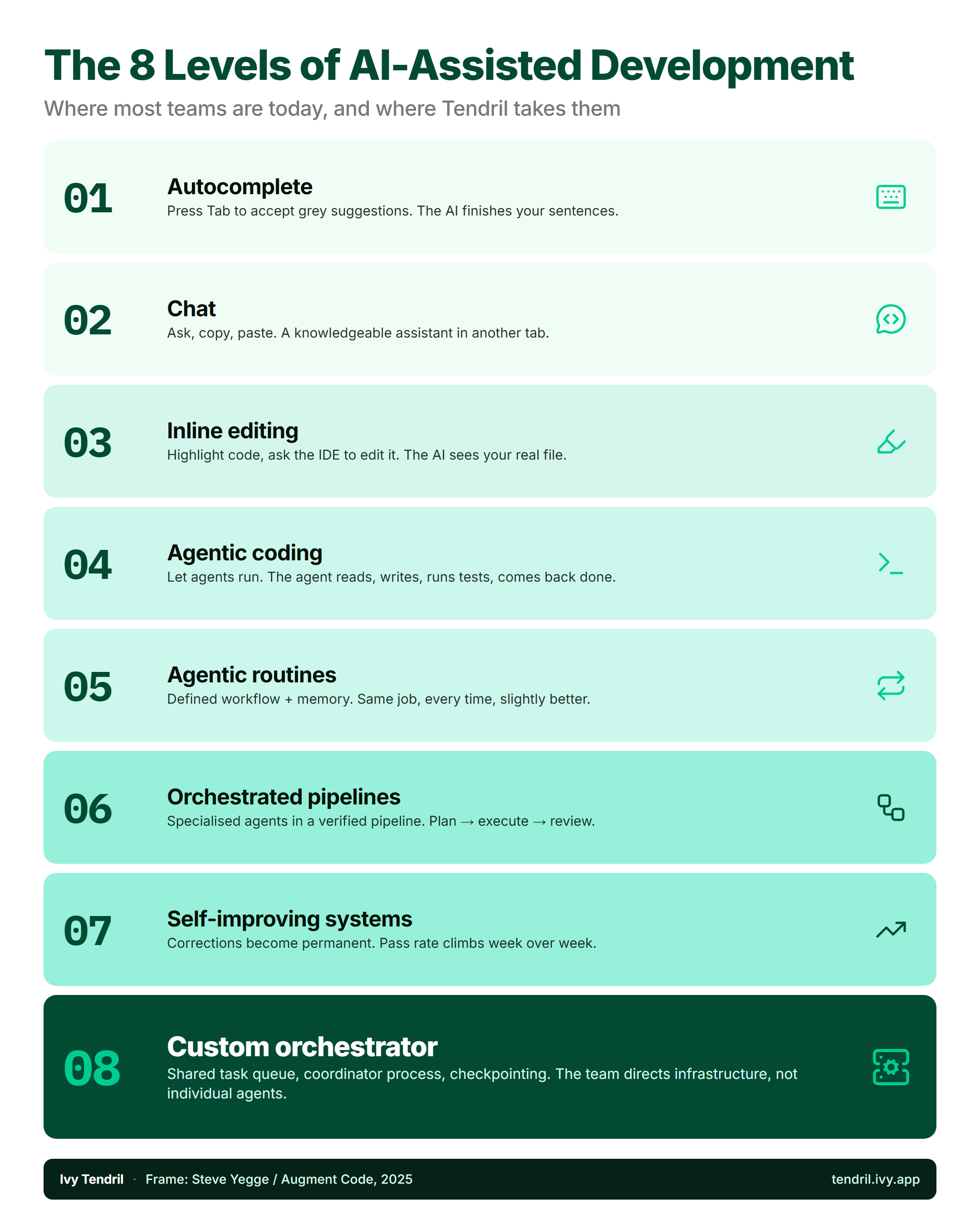
When an AI agent attempts to generate or refactor a Blazor application, it routinely struggles:
- Razor's blended HTML/C# templating syntax produces frequent compilation and parsing errors when generated by LLMs.
- Complex
IJSRuntimeinterop patterns confuse model context windows. - Blazor projects lack sandboxed execution environments, risking broken main branches.
In contrast, Ivy was purpose-built for Level 8 Agentic Orchestration with Ivy Tendril:
- Clean Separation of Concerns: Coding agents excel at writing declarative C# view models and isolated React/Tailwind frontend components.
- Worktree Sandboxing: Tendril runs every agent task in an isolated Git worktree, and the change only reaches a human after automated verification gates pass.
- Multi-Model Routing: As described in our guide on multi-model routing and AI budgets, Tendril routes routine triage to fast, cost-effective models (Gemini Flash-Lite, Haiku) and deep architectural plans to frontier models (Claude 3.7 Sonnet, Opus), slashing token spend by 50% to 75%.
- Native MCP Support: Ivy Framework ships with a built-in Model Context Protocol server based on Anthropic's MCP Specification, allowing agents inside Tendril to inspect database schemas, verify endpoints, and execute migrations autonomously.
When Should You Still Choose Microsoft Blazor?
We believe in choosing the right tool for the job. Microsoft Blazor remains a viable option in specific scenarios:
- 100% C# Internal Monoliths: If your organization has an absolute corporate policy forbidding any JavaScript or TypeScript in source repositories, and you have zero need for external frontend libraries.
- Existing Blazor Codebases: If you have an established Blazor application with dozens of custom Razor components that are already paid for and working adequately.
- Low-Concurrency Intranets: If you are deploying internal CRUD dashboards for teams of 10 to 50 users on high-speed corporate LAN networks where SignalR reconnection latency is negligible.
However, if you are building customer-facing software, high-concurrency internal applications, or AI-accelerated workflows that require modern UI performance, Blazor's architectural trade-offs will quickly become your team's primary bottleneck.
Frequently Asked Questions
Can I use existing .NET libraries with Ivy?
Yes. Ivy runs on standard .NET 10. You can use Entity Framework Core, Dapper, MediatR, MassTransit, and any existing NuGet package with zero modification.
How does Ivy compare to low-code tools like Retool?
Unlike Retool, which locks you into proprietary JSON schemas and expensive per-seat subscriptions ($10–$50/user/month), Ivy is 100% open-source, code-first, and Git-native. You maintain full ownership of your code, deploy via standard Docker containers, and pay zero licensing penalties as your team scales.
Can I build mobile-responsive interfaces in Ivy?
Yes. Because Ivy frontends render native React with Tailwind CSS, your UI is completely responsive out of the box, with full support for fluid layouts, dark mode, and mobile touch events.
How do I get started with Ivy?
You can explore the open-source repository at GitHub or review our production architecture documentation.
Next Steps
Upgrading your application stack does not require rewriting your entire backend from scratch. Ivy lets you preserve your core C# domain logic while giving your users the speed and elegance of modern React.
- Explore the Code: Clone Ivy Tendril on GitHub.
- Read the Architecture Guide: Work through what a software factory is and the eight-point production checklist for agent orchestration.
- Schedule a Strategy Call: Email renco@ivy.app to arrange a 30-minute architecture review with an Ivy engineer.